 RockCloud-基石云安全-官方博客
In today's digital operations, no one can guarantee that their business will never become a target of DDoS attacks. When attack traffic instantly overwhelms bandwidth, or CC attacks cause API endpoints to return 502/504, the operations team faces not only technical challenges but also a crisis of business reputation.
Many managers ask: "We're already down, is it too late to deploy defense now?" The answer is yes, but only if you have a mature emergency response mechanism in place.
1. Why does "emergency response" need to be fast?
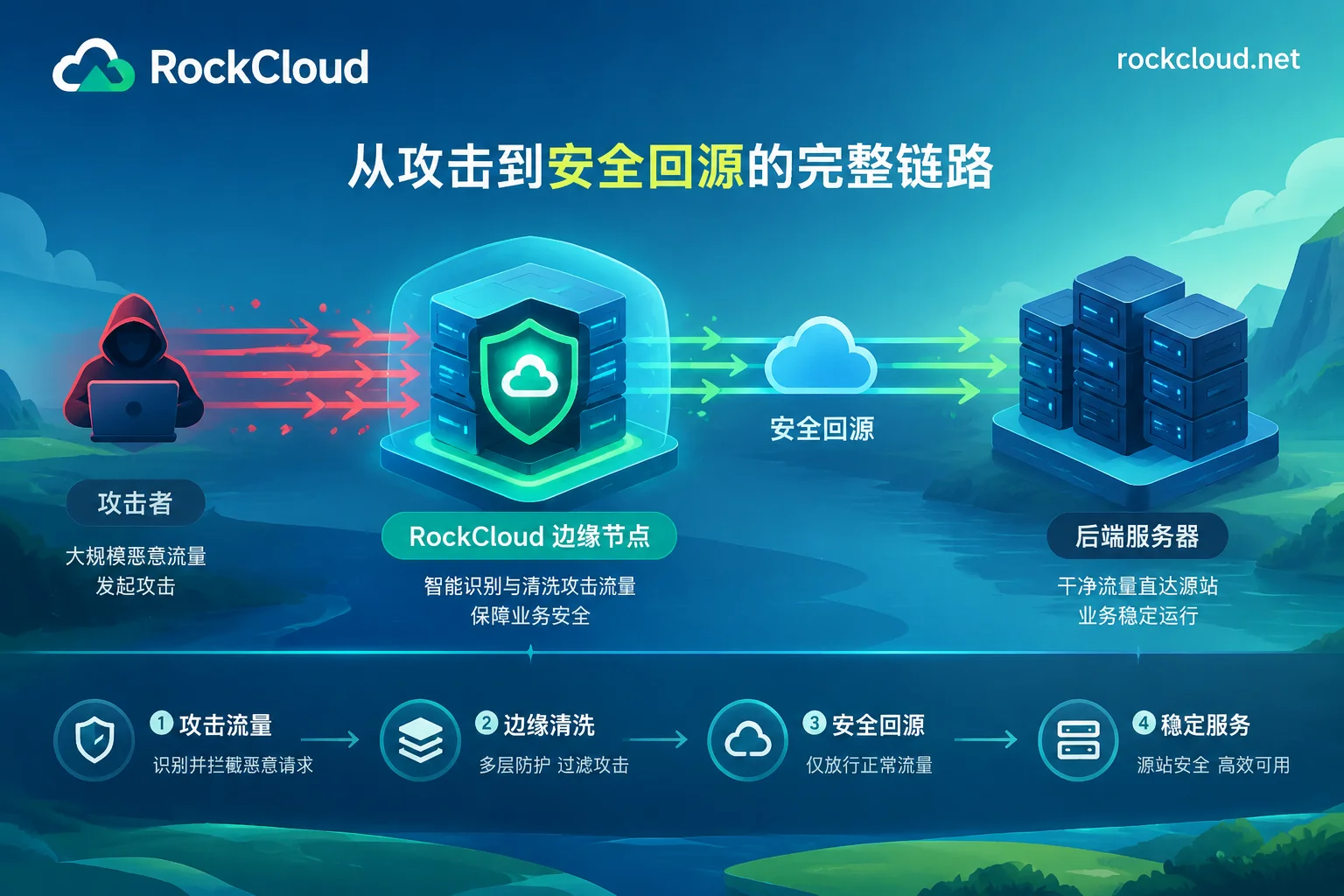
Traditional protection onboarding often involves complex network adjustments, such as changing NS records or synchronizing configurations, which take too long. During an ongoing attack, time is money. The core logic of RockCloud's emergency response is: "Hide the origin server + scrub traffic". Using Anycast distributed scrubbing technology, we filter traffic before it reaches your server. Even for a business under attack, by synchronously changing the origin IP, business traffic can be quickly routed through the high-defense link for scrubbing before returning to the origin.
2. RockCloud Emergency Onboarding in Four Steps
If you are currently in a crisis, please follow these steps:
- Step 1: Contact the emergency channel immediately
Don't bear the pressure alone. You can directly reach the security technical team via the contact page or Telegram (@rockclouds), and explain your current business type (website, game, API, etc.). Step 2: Configure high-defense and protection architecture
- Website/API business: Use high-defense CDN. Simply add a CNAME to onboard without modifying NS. The old link runs in parallel to ensure business continuity.
- Game/non-HTTP protocols: Use game shield to encapsulate private protocols. Even if a node is attacked, it can automatically switch, keeping user connections uninterrupted.
- Step 3: Close the origin and change IP
To prevent attackers from bypassing the CDN and attacking the origin directly, synchronously changing the origin IP is essential. Configure the firewall to only allow RockCloud's back-to-origin nodes, ensuring attack traffic cannot reach the server. - Step 4: Enable WAF protection with one click
Besides withstanding DDoS, for CC attacks that simulate real user behavior, you can enable intelligent WAF with one click in the control panel. It uses machine learning to identify anomalous requests without complex rule configuration.
3. Why choose RockCloud for defense?
There are many protection products on the market. Why do enterprises choose us as their emergency first choice?
- Integrated defense and acceleration: You don't need to purchase acceleration and defense services separately. Our high-defense CDN performs scrubbing and distribution on the same request path. It not only defends but also makes your business faster through global CDN acceleration.
- Transparent billing, no traps: We use fixed peak billing with unlimited traffic and requests, so you no longer worry about "sky-high bills" caused by malicious abuse. For details, see our pricing plans.
- Full protocol coverage: Whether it's card games, IM communications, live streaming, or AI services, we have mature industry solutions (click here to view).
4. Don't let emergency response become the norm
Although emergency response can help you through difficulties, for core businesses, establishing a permanent protection architecture is the fundamental solution. You can first apply for a free trial from customer service, determine the specifications, and then go live.
Operations mantra: The best protection is that you have already hidden and redundant before an attack occurs. If your business is unstable now, feel free to contact us for a security diagnosis.



Comments(0)